Rust Cheats
Undetected Rust Cheats with Aimbot & ESP
Browse the best Rust cheats with aimbot, ESP, and advanced features designed for maximum performance. Our Rust cheats include instant delivery, full setup guides, and responsive support.
Aimbot
Enable
Mode: Memory
Objectives: All
Hitbox: Head
Prediction
Only Visible
Field of View (FOV)
Target Li...
Aimbot
Enable
Mode: Memory
Objectives: All
Hitbox: Head
Prediction
Only Visible
Field of View (FOV)
Target Line
Skip Knocked Targets
Hitchance
Combat – Exploits
Hitmaterial Override
Hitbox Override
Thick Bullet
Legit Instant Eoka
Adjustable Eoka Value
Instant Compound
Instant ADS
Shoot While Mounted
Rapid Fire
Adjustable Rapid Value
Force Burst
Fast Bow
Combat – Recoil
Recoil Compensation
Recoil X
Recoil Y
Spread Compensation
Spread Value
No Sway
Combat – Patrol
Enable
Mode: Memory
Hitbox: Main Rotor
Maximum Distance
Field of View (FOV)
Target Line
Visuals – Players
Enable
Render Distance
Category Filtering
Teammate Highlighting
Visibility Check
Skeleton Overlay
Bounding Box
Username Display
Held Item Display
Distance Indicator
Team ID Display
Chinese Hat Indicator
Snaplines
Hotbar Display
Hotbar Wear Indicator
Mini Belt Display
Player Flags
Direction Line
Visuals – NPC
Enable
Render Distance
Visibility Check
Skeleton Overlay
Bounding Box
Username Display
Held Item Display
Distance Indicator
Team ID Display
Chinese Hat Indicator
Snaplines
Hotbar Display
Hotbar Wear Indicator
Mini Belt Display
Player Flags
Direction Line
Visuals – Local
Crosshair
Hit Notifications
Bullet Tracers
Weapon Laser
Reload Bar
Ammo Count
OOF Arrows
Anti-Fly Kick Indicator
Visuals – Chams
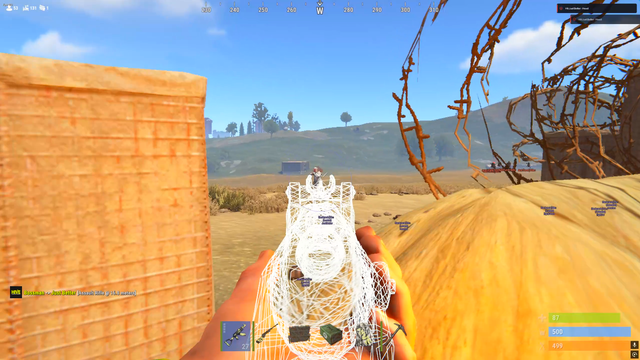
Player Chams
Weapon Chams
Hand Chams
World – General
Enable
FOV Stacking
Bounds Display
Best Farming Route
World – Resources
Resource ESP
Distance Indicator
Icon Display
Distance Adjustment Slider
Type Filtering
Collectible Minerals
Recycler Locations
World – Collectables
Collectable ESP
Distance Indicator
Icon Display
Distance Adjustment Slider
Type Filtering
World – Crates
Crate ESP
Distance Indicator
Icon Display
Distance Adjustment Slider
Type Filtering
World – Animals
Animal ESP
Distance Indicator
Icon Display
Distance Adjustment Slider
Type Filtering
World – Vehicles
Vehicle ESP
Distance Indicator
Icon Display
Distance Adjustment Slider
Type Filtering
World – Traps
Trap ESP
Distance Indicator
Icon Display
Distance Adjustment Slider
Type Filtering
Radius Indicator
Gun Trap Ammo Type
Auto Turret Aim Line
World – Base
Base Item ESP
Distance Indicator
Icon Display
Distance Adjustment Slider
Type Filtering
Tool Cupboard Health Bar
Tool Cupboard Upkeep Timer
World – Stashes
Stash ESP
Distance Indicator
Icon Display
Distance Adjustment Slider
Type Filtering
World – Misc
Distance Indicator
Icon Display
Corpses
Backpacks
Weapons
Dropped Items
Distance Adjustment Slider
Misc – Tweaks
FOV Changer
Zoom
Iron Sight Zoom
Aspect Ratio Adjustment
Day Parameters
Night Parameters
Bright Night
RGB Sky
Time Changer
Perfect Climate
Misc – Exploits
Remove Layers
Remove Trees
Extended Melee Range
Shoot While Airborne
Infinite Jump
Disable Animations
No Fall Damage
Aim with Heavy Weapons
Remove Heavy Movement Penalty
Disable Helmet Overlay
Omnisprint
Spiderman Movement
Fast Suicide
Third Person View
Debug Camera
Anti-Fly Kick
Misc – Radar
Radar Display
Settings – General
Accent Color Customization
Font Size Adjustment
Load Configuration
Save Configuration
Open Configuration Files
Compatibility info
Setup guidance
Support options
AVAILABLE
Akuma Full (Rust)
System Requirements
Supported CPU: Intel + AMD
Supported Windows Version: 10 – 11 (W11 25H2 Supported)
For Controll...
System Requirements
Supported CPU: Intel + AMD
Supported Windows Version: 10 – 11 (W11 25H2 Supported)
For Controller Use Remapper
Silent Aim
Enable Silent Aim
Bone Selection
Aim Keybind
FOV Radius
Aim Filter
Max Distance
Ignore Sleepers
Ignore Bots
Ignore AI/Bots
Draw Line to Target
Show FOV Circle
Show Aim Target Line
Vector Aimbot
Enable Vector Aimbot
Bone Selection
FOV Radius
Smoothness
Target Prediction
Keybind
Aim Filter
Max Distance
Ignore Sleepers
Ignore Bots
Draw Line to Target
Show FOV Circle
Show Target Line
Players ESP
Enable ESP
Boxes
Skeletons
Nickname
Distance
Rank/Score
Level
Held Item
Hot Bar
Wear Bar
Hide Teammates
Max Distance
Show Sleepers
Show Bots
Separate Bot Settings
Chams
Player Chams
Bot Chams
Custom Chams Styles
World ESP
Workbench
Tool Cupboard
Large Box
Small Box
Sleeping Bag
Wood
Metal
Stone
Sulfur
Hemp
Food Items
Barrels
Crates
Dropped Items
Corpses
Animals
Animals
Misc Features
No Recoil
No Weapon Sway
No Spread
No Spread
No Spread
Combat Mode Hotkey
ESP Font Size
Custom Crosshair
Config System:
Create Config
Load Config
Delete Config
Compatibility info
Setup guidance
Support options
AVAILABLE
Nexus (Rust)
Features
Platform Compatibility
Internal Utility
Stream-Compatible Across All Platforms
AIM
Aimbot Settings
En...
Features
Platform Compatibility
Internal Utility
Stream-Compatible Across All Platforms
AIM
Aimbot Settings
Enable
Aim Type (Silent; Memory)
Aim key
Hit Chance (slider)
Max Aim Distance (slider)
Use Smooth (slider; works only with memory aim)
Draw Fov
Aim Fov (slider)
Aim Bone: Head | Neck | Stomach | Closet | Closet No Head
Target Settings
Targeting options for various entities.
EnemiesNpcsTeammatesSleepersFriendsLock TargetLock Target keyShow Belt ItemsBelt Items Scale (slider)
Visuals & Miscellaneous
Visual overlays, effects, and other options.
Crosshair
Target line
Prediction Dot
Players: Enemies; Teammates; Npc; Sleepers.
Enable
Box: color
Name: color
Weapon Name: color
Weapone Icon: color
TeamID: color
Distance: color
Skeleton: color
Look Direction: color
Look Alert: color
Explosive Flags: color
Off Arrows: color
Arrows Range (slider)
Max Render Distance (slider)
Player Chams
Chams Style (14 types)
Bright Night
Bright Night Value (slider)
Change Time
Time Value (slider)
Bright Caves
Remove Layers: Water | Deployed | World | Terrain | Clutter | Tree
Last Death Position
Debug Camera
Debug Camera key
Player Fov
Fov Value (slider)
Zoom
Zoom key
World & Environment
Resource, object, and environment highlighting.
Ore
Crates
Animals
Collectables
Deployables
Traps
Transport
Other
Raid
Raid-specific visuals and timers.
Enable
Raid Timer (slider)
Draw C4
Draw Rockets
Draw Explosives
Draw Sachel
Draw Beancan
Object Setup
Object visualization settings.
Enable: color
Draw Name
Draw distance
Limit Distance (slider)
Miscellaneous
General options like FPS, battle mode, language, etc.
FPS limit
Show FPS
Battle Mode
Battle Mode key
Font style: Pixel | Bold | Normal
Language: English | Chinese
Friendship
Enable, Add Friend key.
Enable
Add Friend key
Other
Panic Button
Chams
Hand Chams (14 types), Weapon Chams (14 types)
Hand Chams (14 types)
Weapon Chams (14 types)
Misc
Last Death Position, Debug Camera options.
Last Death Position
Debug Camera
Debug Camera key
Compatibility info
Setup guidance
Support options
Choosing the Best Rust Cheats
Start with your goal in Rust or modern Rust titles. Whether you're trying to win more gunfights,
improve map awareness, or progress faster, choosing the right cheat depends on your playstyle and setup.
Always review the product page for feature lists, system compatibility, and setup instructions before getting started.
Choose for your playstyle
Select features based on how you play—some users prefer subtle configs, while others want maximum performance for high-kill matches.
Check compatibility
Make sure the tool supports your current game version, operating system, and any required settings before installing.
Follow setup steps
Proper setup is essential. Following the guide correctly helps prevent crashes, loading issues, or detection risks.
Prioritize reliability
Look for tools that are regularly updated and supported to ensure long-term usability and stability.
How to Choose the Right Cheat
Your choice depends on what you want to achieve—whether it's winning more fights in Rust,
unlocking content faster, or improving consistency in multiplayer modes.
Check for included features like ESP, aim assistance, and other enhancements, along with setup requirements.
Pick based on your goal
Different setups offer different advantages, so choose one that aligns with your gameplay style and objectives.
Check system requirements
Ensure your PC meets the requirements and any necessary settings are configured before launching.
Read the guide
Following the provided instructions carefully will help you avoid common setup mistakes.
Look for active updates
Regular updates indicate ongoing support and better long-term performance.
Delivery & Support
Most products are delivered instantly after purchase. If manual activation is required,
this will be clearly stated. Support is typically available for installation help and troubleshooting.
Improve Accuracy: Rust Aimbot Features
In fast-paced games like Rust, accuracy plays a major role in every engagement.
With extremely low time-to-kill, even small improvements in aim can significantly impact your performance.
Aimbot systems are designed to improve tracking, target acquisition, and shot consistency.
Whether you're playing aggressively or holding angles, these tools can help make your aim more reliable.
Lower-quality tools often result in unnatural movement or inconsistent behavior.
More advanced options include adjustable smoothing and customizable FOV settings to create more natural aiming patterns.
Game Awareness: ESP, Wallhack & Radar
Awareness tools provide additional information about your surroundings, helping you make better decisions in real time.
Instead of relying only on sound and the minimap, you gain a clearer view of what’s happening across the map.
ESP Features
Displays enemy positions, health, distance, and other key details to improve awareness and positioning.
Wall Visibility
Helps identify opponents through terrain and structures, making it easier to react and reposition.
Radar Systems
Provides a live overview of enemy movement, allowing you to plan rotations and avoid risky situations.
Performance & Stability
Reliable tools are designed with both performance and stability in mind.
Regular updates and ongoing maintenance help ensure compatibility with game updates and reduce potential issues.
Consistent updates: Keeps tools working with the latest patches.
Active monitoring: Helps maintain functionality over time.
Clear status info: Lets users know when updates are needed.
Why Players Look for an Advantage
Rust games are highly competitive, and many players look for ways to improve performance faster.
Between skill gaps, matchmaking, and limited playtime, it can be difficult to keep up without assistance.
Faster progression: Improve stats and unlock rewards more quickly.
Better awareness: Make smarter decisions in fights and rotations.
More consistent gameplay: Reduce missed shots and improve accuracy.
Efficient looting: Spend less time searching and more time engaging.
FAQ
How do I choose the best option?
Look for features that match your needs, check compatibility, and review setup requirements before purchasing.
How fast is delivery?
Most products are delivered instantly, unless otherwise stated on the product page.
Is support available?
Yes, support is typically provided for setup and troubleshooting.





Share and get 15% off!
Simply share this product on one of the following social networks and you will unlock 15% off!